

Why you can trust Sunlight Media
- Expertise and Experience:Our content is crafted by seasoned professionals with extensive experience in digital marketing, ensuring you receive accurate and actionable advice.
- Unbiased Information:We provide impartial insights and recommendations based solely on what's best for your business, without any hidden agendas or promotions.
- Thorough Research:Our articles are backed by comprehensive research and the latest industry trends, ensuring you stay informed with reliable and up-to-date information.
- Transparency and Honesty:We believe in complete transparency. We disclose our sources, methodologies, and any potential conflicts of interest, so you can trust the integrity of our content.
- Continuous Improvement:We constantly review and update our content to reflect the latest developments in digital marketing, so you always have access to the most current and relevant information.

Static Site Generators (SSGs) create fast, secure HTML websites, and tools like Surge.sh simplify deployment to a single command line interface.
Key Takeaways
- Static Site Generators build HTML-only sites for superior performance and security.
- Surge offers free, instant command-line deployment for static web projects.
- Static sites load faster than dynamic sites by eliminating server-side processing.
Last Updated: December 22, 2025
Web app developers constantly seek efficient tools for website deployment. A Static Site Generator (SSG) simplifies the coding process. This setup suits projects that do not need server-side processing. Developers now favor serverless architectures to handle endpoints. This article explains the growth of static sites and serverless web applications.
What are Static Site Generators?
Developers use Static Site Generators to build HTML-only websites. These sites run on raw data and templates. Raw data often exists as “markdown files.” Markdown files are text files. They use the Markdown language dialect (Link: https://guides.github.com/features/mastering-markdown/). Plain text formatting uses symbols to create bold text, headers, and lists.
These files require little programming knowledge. They are simple to create. Each webpage has a specific HTML file. This file displays the same content to every user. The generator builds these files for transfer to a live server.
Static Sites versus Dynamic Sites
Static websites use client-side HTML and CSS. A server sends these pre-packaged files immediately when a user visits. Popular generators in 2025 include Jekyll, Next.js, and Astro. Dynamic websites rely on server-side scripts. Examples include JavaScript, PHP, and ASP. A dynamic server builds a new HTML file every time a user requests a page.
What is Surge?
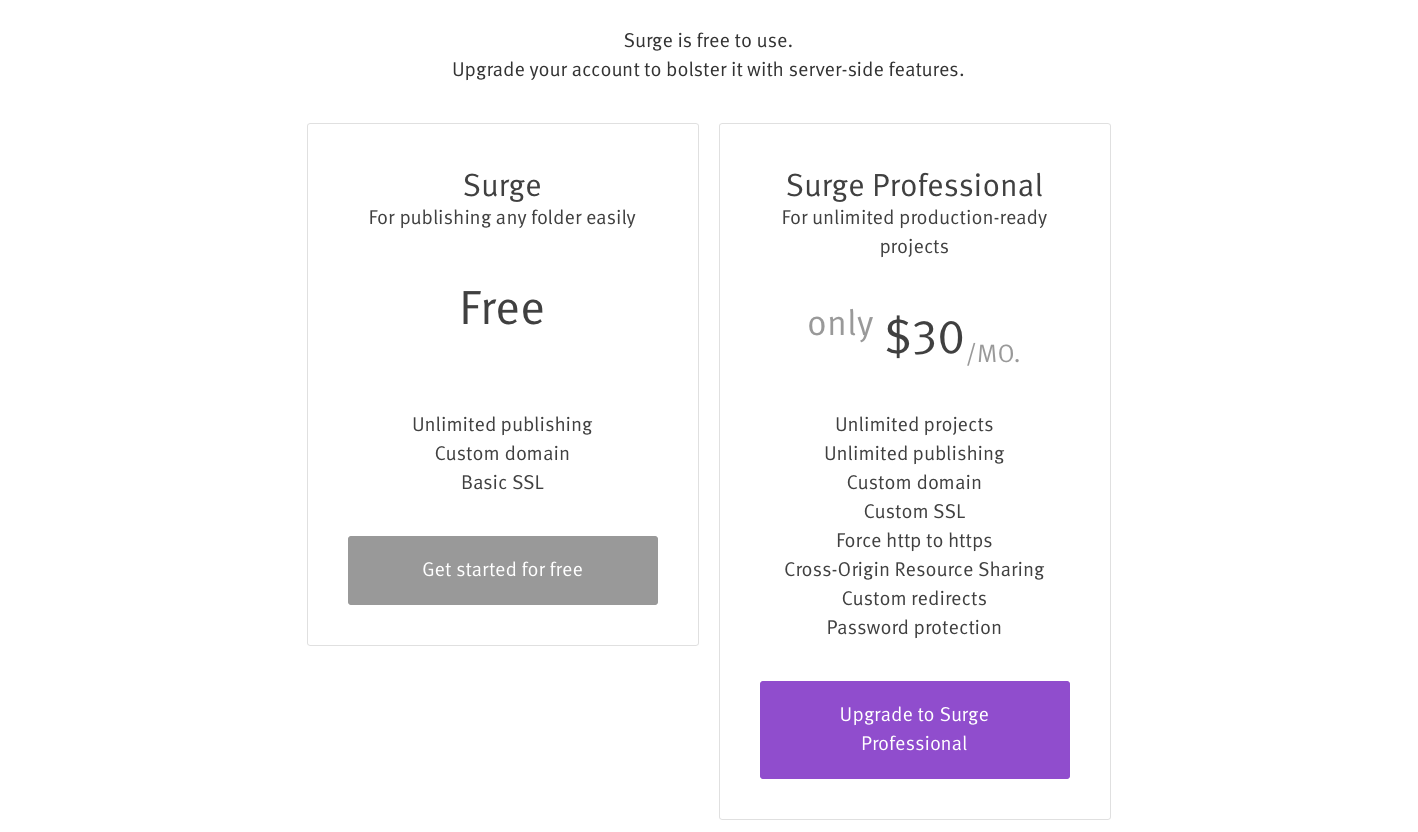
Surge hosts and deploys static websites. It supports projects from generators like Gatsby.js, Jekyll, and Astro. Custom projects with HTML, CSS, and JavaScript also work. The free plan suits most static sites. You configure the service via the command line. A premium version adds features like Custom SSL and password protection.
Why Should I Use Surge?
Surge is a convenient tool for front-end developers. It is straightforward. You publish a static site in seconds. Deployment requires a few terminal commands. No financial investment is necessary. Users add personal domains, share projects, and create 404 pages. See our case study on rapid deployment for real-world examples.
Is Surge a Free Service?
Surge offers a free tier. Surge Professional offers benefits for a monthly fee. The premium version starts around $30 per month. This charge allows unlimited professional projects. It includes custom SSL for secure HTTPS connections. You can also share resources, create redirects, and password-protect projects.
The free plan works for small or personal websites. Surge Premium helps users who publish professional projects regularly.
Installing Surge
Surge installation is simple. Open a terminal window. Type the following command:
npm install --global surge(Note: Ensure Node.js and npm are installed. Download the latest versions from the Node.js website.)
Check the installation status. Enter node -v in the command line.
Surge asks you to create an account during the first run. Provide an email address and password. Verify your email. You are now ready to deploy.
Deploying Your Site
Locate the file path of your project directory. For example, use a project at /Users/air/surge-test.
Run the following command in the terminal:
surgeYour email address displays. Provide the project file path:
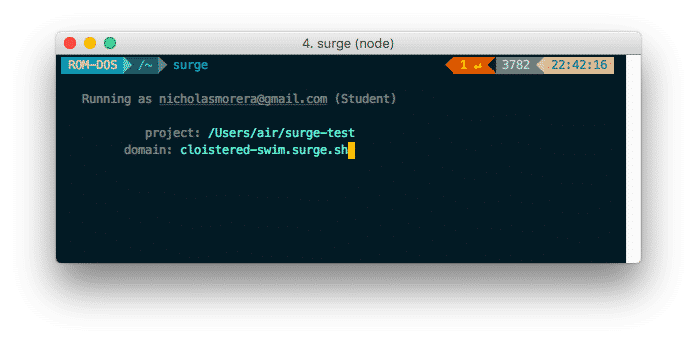
Enter the full file path. Hit enter.
Surge assigns a random domain name. You can create a custom domain if available. Enter your domain name. Hit enter.
(Note: An error message appears if the domain is taken: Aborted - you cannot publish to [<custom-domain.surge.sh>])
A success message appears in the terminal upon completion. The domain name and IP address show where to access the site.
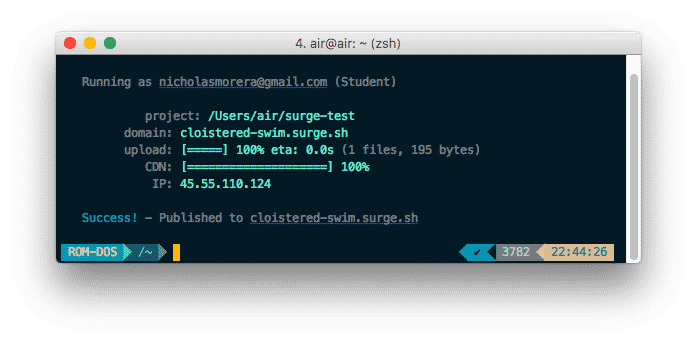
Enter the domain name in a browser. Your site is now live.

Adding a Custom Domain Name
Using a CNAME Record
Surge provides a custom subdomain by default. It looks like your-custom-domain.surge.sh. Professional projects require a custom domain.
Add two CNAME records in your DNS panel. Set one hostname to @ and the other to www. Point both records to this address:
na-west1.surge.shUsing an A record
Some providers block CNAME records on the root domain. Set an A record instead. Point the A record to IP address 45.55.110.124.
Using Custom Subdomains
You can point any subdomain to Surge. Examples include sub.my-cool-site.com. Set up a new CNAME record. Point it to na-west1.surge.sh. Set the hostname to *. This wildcard allows any subdomain.
Surge recognizes DNS changes quickly. Propagation usually takes 24 to 48 hours.
Deploying Projects using Custom Domains
Deploy the project after DNS settings propagate. Specify the domain in the command. Run the surge command with the file path and domain:
surge file path/of/project a-cool-custom-domain.comBind Custom Domains to Projects
Bind the domain to the project to save time. This removes the need to type the domain every deployment. Use the echo command to create a CNAME file:
echo a-cool-custom-domain.com > CNAMESharing your Surge project

Publish your project first. Use the add command to include collaborators. Enter their email addresses:
surge --add collaborator@email.comGuests receive an invitation. They can publish source files to the same domain after acceptance.
Listing Surge Projects
View your published projects. Type this command into the terminal:
surge listAdding Custom 404 Error Pages
Replace the default 404 page. Add a 404.html file to your project. Run the surge command to deploy the new files.
Create a .surgeignore file
Surge uses an ignore file like Git. Create a list of files to exclude from deployment. This keeps development files private.
Create a file named .surgeignore in the project root. List files or directories to ignore. Examples include node_modules. Use the wildcard symbol * to ignore specific file types.
Remove the Site from Surge
Take down a website using the teardown command. Follow the command with the domain:
surge teardown your-domain.comUpdate Surge to the latest version before removal.
Comparison of Surge and Github Pages
Github Pages hosts static sites in a Github repository. It is a popular alternative. Developers rank it highly. It supports Project pages and User/Organization pages. The default domain is github.io. Github Pages limits commercial use. It suits non-commercial or personal projects.
Project pages publish from specific branches. User pages publish from the master branch. URLs follow the username.github.io format.
Benefits of Surge
Surge offers benefits over Github Pages. Surge supports client-side routing. It serves a backup file (200.html) for nonexistent paths. This prevents 404 errors on single-page applications.
Surge deploys changes instantly. You type the command and view the site online. This speeds up testing. Github Pages requires commits and pushes. Surge simplifies the process for software developers.
Conclusion
Surge streamlines static site deployment. It helps developers launch websites quickly. Surge is user-friendly for beginners and experts alike.
Surge provides tools to manage websites and generate leads effectively. Its automation and configuration options make it a top choice for static sites. Try Surge to improve your development workflow.
Frequently Asked Questions
What is Surge?
Surge is a cloud platform used to publish static web applications and websites via a simple command-line interface.
Is Surge free to use?
Yes, Surge offers a generous free tier for unlimited publishing. A paid “Plus” plan is available for advanced features like custom SSL.
How do I install Surge?
You install Surge using Node Package Manager (npm). Run the command npm install --global surge in your terminal.
Can I use a custom domain with Surge?
Yes, you can use custom domains. You must add a CNAME record in your DNS settings pointing to na-west1.surge.sh.
How do I remove a site from Surge?
Use the command surge teardown your-domain.com in your terminal to remove a deployed project.
What is the difference between static and dynamic sites?
Static sites serve pre-built HTML files immediately. Dynamic sites generate HTML on the server every time a user requests a page.
Does Surge support SSL?
Surge provides basic SSL for all `*.surge.sh` subdomains. Custom SSL certificates are available on the paid plan.
How do I share a Surge project?
You share a project by adding collaborators via the command line. Run surge --add email@address.com to grant access.













2 Comments
fantastic blog, thanks for published.
i am getting following issue, please advise how to resolve
Aborted – No such file or directory: C:\Users\lenovo\Desktop\UrduBootCamp\UrduBootCamp\UrslanAli.surge.sh